

Create Installation Target with CertGuardian API
Auth
Make a request to the login endpoint to obtain the bearer token
POST /api/login
curl --location '{{baseUrl}}/api/login' \
--header 'Content-Type: application/json' \
--header 'Accept: application/json' \
--data-raw '{
    "email": "dcano2@entorno.es",
    "password": "password"
}
'
Replace with the base url of your CertGuardian backend
Body example:
{
     "email": "dcano2@entorno.es",
     "password": "password"
}
Response:
{
     "user": {
         "id": 2,
         "name": "dcano2",
         "email": "dcano2@entorno.es",
         "email_verified_at": null,
         "created_at": "2026-03-19T07:30:10.000000Z",
         "updated_at": "2026-03-19T07:30:40.000000Z",
         "allowed_ips": [
             "172.19.0.1"
         ],
         "is_admin": true
     },
     "token": "287|GKRNDQijgGY6myOTF3n4GMg9zqCeQ1SLxZ0fgplg0f2d5ccc",
     "expires_at": "2026-09-05T07:58:21.000000Z",
     "expires_in_minutes": 1440
}
Every request afterwards needs to attach the token you got from the response as a header
--header 'Authorization: Bearer your-bearer-token'
Obtain Install Type id
List all Install Types to get the id of the Install Type you want to create a Installation Target
GET /api/tipos-instalacion-list/
curl --location '{{baseUrl}}/api/agent/certificates/list' \
--header 'Accept: application/json' \
--header 'Content-Type: application/json' \
--header 'Authorization: Bearer your-bearer-token'
Response: 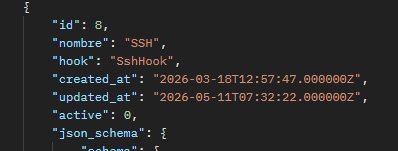
Obtain install type properties
The configuration properties json config that the Installation Target need are in json_schema -> schema -> properties 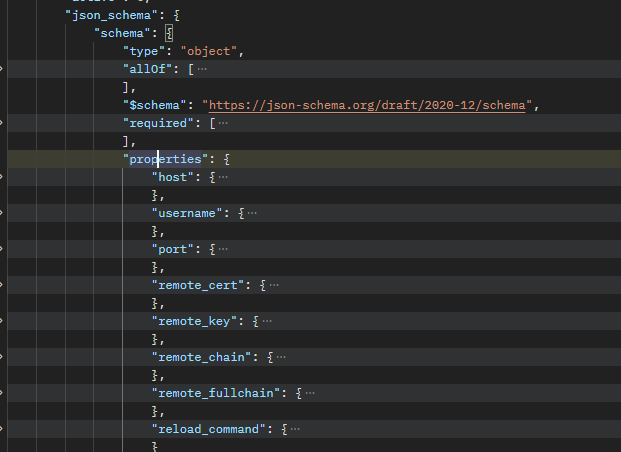
In this case the configuration names are:
host,username,port,remote_cert,remote_key,remote_chain,remote_fullchain,reload_commad
Validate Installation Target configuration
Validate the Installation Target configuration making a request to the validate-config endpoint
POST /api/tipo-instalacion/:tipoInstalacion/validate-config
curl --location '{{baseUrl}}/api/instalaciones/test-connection/8' \
--header 'Content-Type: application/json' \
--header 'Accept: application/json' \
--header 'Authorization: Bearer your-bearer-token' \
--data '{
  "host": "192.168.1.100",
  "username": "root",
  "port": 22,
  "remote_cert": "/path/to/private/key",
  "remote_key": "/path/to/private/key",
  "remote_chain": "/path/to/private/key",
  "remote_fullchain": "/path/to/private/key",
  "reload_command": "systemctl reload nginx"
}'
Body example:
{
   "host": "192.168.1.100",
   "username": "root",
   "port": 22,
   "remote_cert": "/path/to/private/key",
   "remote_key": "/path/to/private/key",
   "remote_chain": "/path/to/private/key",
   "remote_fullchain": "/path/to/private/key",
   "reload_command": "systemctl reload nginx"
}
Ok Reponse (200):
{
	"correct":true,
	"message":"SSH key copied successfully"
}
Error response (200):
{
     "correct": false,
     "message": "SSH connection failed: The command \"'ssh' '-i' '/var/www/certguardian/ssh-keys/id_rsa' '-o' 'StrictHostKeyChecking=no' '-o' 'UserKnownHostsFile=/var/www/certguardian/ssh-keys/known_hosts' '-o' 'BatchMode=yes' '-o' 'ConnectTimeout=30' '-i' '/var/www/certguardian/ssh-keys/id_rsa' 'root@192.168.1.100' 'echo \"Certguardian SSH connection test successful\"'\" failed.\n\nExit Code: 255(Unknown error)\n\nWorking directory: /var/www/certguardian/public\n\nOutput:\n================\n\n\nError Output:\n================\nssh: connect to host 192.168.1.100 port 22: Connection refused\r\n"
}
Create Installation Target
The Installation Target can be created now:
POST /api/servidores
curl '{{baseUrl}}/api/servidores' \
  -X POST \
  -H 'Authorization: your-bearer-token' \
  --data-raw '{"ip":"Apache Server","tipo_instalacion_id":2,"descripcion":"certguardian.es server",  "config_json":     {       "host": "192.168.1.100",       "username": "root",       "port": 22,       "remote_cert": "/path/to/private/key",       "remote_key": "/path/to/private/key",       "remote_chain": "/path/to/private/key",       "remote_fullchain": "/path/to/private/key",       "reload_command": "systemctl reload nginx"     }}'
Body example:
{
  "ip":"Apache Server",
  "tipo_instalacion_id":2,
  "user_id":null,
  "descripcion":"certguardian.es server",
  "config_json":
    {
      "host": "192.168.1.100",
      "username": "root",
      "port": 22,
      "remote_cert": "/path/to/private/key",
      "remote_key": "/path/to/private/key",
      "remote_chain": "/path/to/private/key",
      "remote_fullchain": "/path/to/private/key",
      "reload_command": "systemctl reload nginx"
    }
}
Replace
tipo_instalacion_idwith your Install Type id andconfig_jsonwith the configuration of the Installation Target from the last step
Ok response (200):
{
"ip":"aaa","common_name":"aa","tipo_instalacion_id":2,"user_id":null,"descripcion":"aaa","config_json":{"PFX":true,"with_password":false,"email_list":["dcano@entorno.es"]}}