Add new DNS Providers to CertGuardian
DNS providers in CertGuardian are supported through Certbot DNS authentication plugins. Each provider is distributed as a separate Python package and integrated directly with Certbot.
You can browse available Certbot DNS provider plugins on PyPI: https://pypi.org/search/?q=certbot
DNS providers from PyPI
If you DNS provider has a package in PyPI, but it's not installed by default in CertGuardian, you can install it by adding the package to a file using the standard requirements.txt format.
Create the requirements.txt file inside the ./backend directory.
Then, mount the file as a volume in docker-compose.yml:
  certguardian:
    image: gitea.entorno.es:3000/certguardian/certguardian:latest
    volumes:
      - ./backend/logs:/var/www/certguardian/storage/logs
      - ./backend/certificates:/certguardian/certificates
      - ./backend/data/:/data
      - ./backend/.ssh:/var/www/certguardian/ssh-keys
      - ./backend/requirements.txt:/var/www/certguardian/extra_python_dependencies.txt
After creating the requirements.txt file and updating the compose file, recreate the container to install the dependencies:
docker compose up --force-recreateYou can check if the package is correctly install with:
docker compose exec certguardian /opt/certbot-venv/bin/pip show your-packageThis will install the dependecies and persist them even after updating the container.
Write your own plugin
If your DNS provider has no PyPI package, you can develop one following the Certbot plugin guidelines.
After writing your Certbot plugin you have to place it inside the ./backend folder, and mount the folder as a volume in docker-compose.yml: Then, mount the file as a volume in docker-compose.yml:
  certguardian:
    image: gitea.entorno.es:3000/certguardian/certguardian:latest
    volumes:
      - ./backend/logs:/var/www/certguardian/storage/logs
      - ./backend/certificates:/certguardian/certificates
      - ./backend/data/:/data
      - ./backend/.ssh:/var/www/certguardian/ssh-keys
      - ./backend/my-custom-plugin:/certguardian/certbot/plugins/my-custom-plugin
The mounted volume must not point directly to /certguardian/certbot/plugins/ it should mount inside it's own folder for the plugin /certguardian/certbot/plugins/my-custom-plugin.
After mounting the folder you can recreate the container to install the custom plugin:
docker compose up --force-recreateYou can check if the custom plugin is correctly install with:
docker compose exec certguardian /opt/certbot-venv/bin/pip show your-packageAdd the new plugin to CertGuardian
The Certbot plugin won't show up automatically on CertGuardian, so it needs to be added: 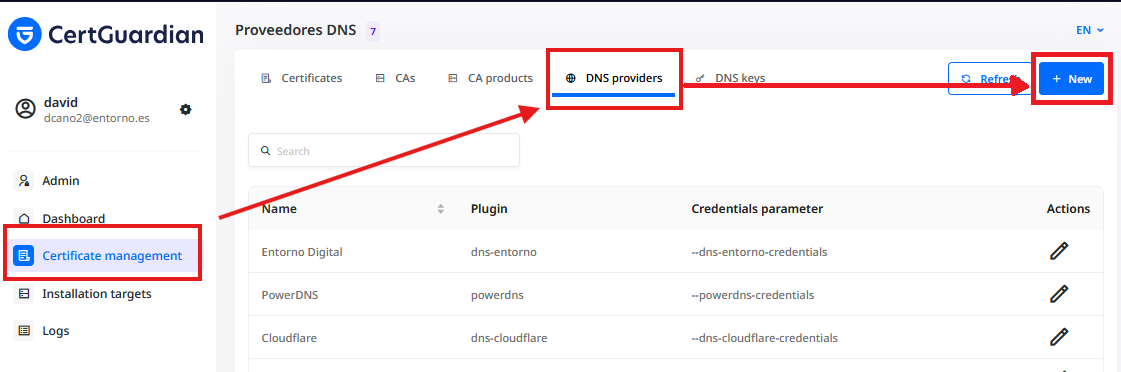
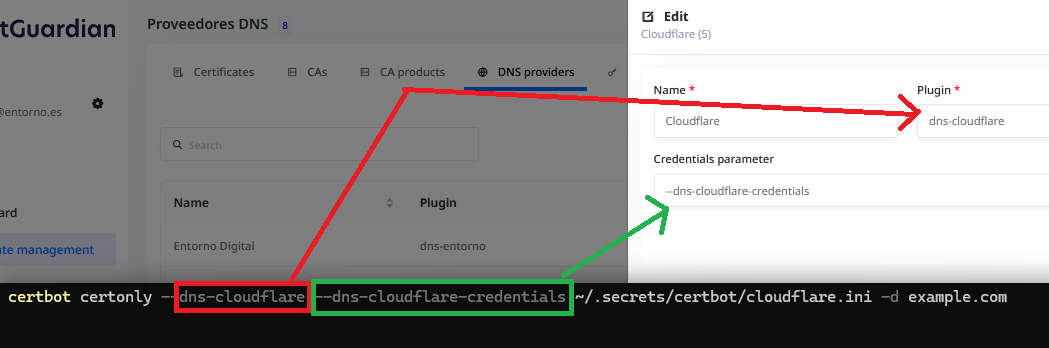
The field plugin corresponds to the name of the plugin.
The field Credentials parameter corresponds to the parameter that Certbot uses to pass the credentials, it must start with --.